Laser Etching & Craft · Guide
A Great Laser Engraver for Small Crafts: The ACMER S1 6W Reviewed
A compact 6W diode laser is enough to start a real craft business. What the ACMER S1 does well, where its limits are, and how to work inside them.
By Robert Anthony · · 8 min read
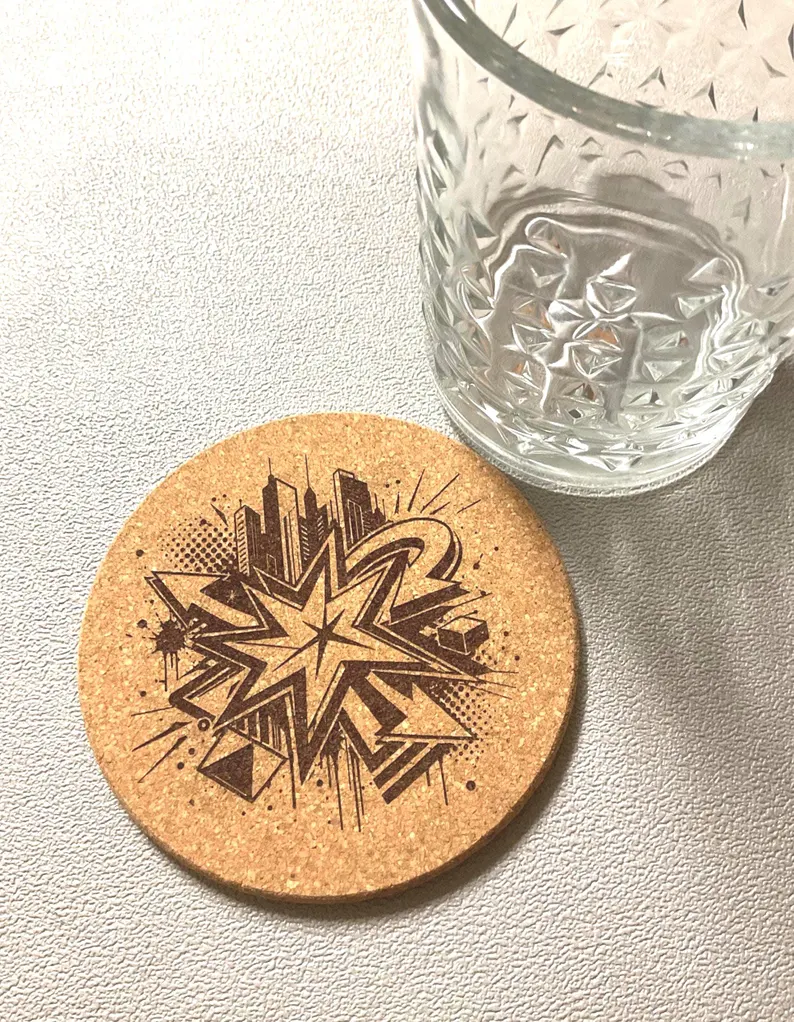
The biggest myth in laser engraving is that you need a large CO₂ machine and a dedicated shop to make anything worth selling. You do not. Most of what a small craft business actually sells — coasters, tags, keychains, ornaments, bookmarks, small signage — fits inside a work area smaller than a sheet of notebook paper.
That is the case for a compact diode machine like the ACMER S1 6W. It is a small, preassembled desktop engraver that sits on a table, plugs into a wall, and starts producing sellable work the same day. This is an honest look at what it does well, where it stops, and how to work inside those limits. Nothing here is sponsored and there are no affiliate links.
The specifications that matter
- 6,000 mW optical output (roughly 48W total machine draw) — enough to engrave deeply and cut thin material.
- 455 nm blue diode with a harmonic lens — the wavelength wood, cork, leather, and anodized aluminum absorb well.
- 130 × 130 mm work area — about 5 × 5 inches, which covers coasters, tags, and most small giftware.
- 0.04 mm spot detail — fine enough for halftone shading and small lettering.
- Preassembled, ~2 kg, 250 × 250 × 162 mm footprint — it is genuinely portable and stores on a shelf.
- Around $140 at the time of writing — roughly the cost of a single wholesale order of blanks.
What it handles well
A blue diode at this power is in its element on organic and coated materials, which is most of the craft market.
- Cork — engraves with excellent contrast and very little scorch. Coasters are the natural first product.
- Wood, plywood, and bamboo — engraves cleanly and cuts thin plywood and MDF with multiple passes.
- Leather — deep, tactile marks on veg-tan; keychains and patches are quick wins.
- Anodized and coated metals — ablates the coating to reveal bright metal underneath. This is how engraved aluminum dog tags are made.
- Slate, ceramic, and painted tile — high-contrast marks with no consumables.
- Opaque acrylic — engraves and cuts thin sheet; clear acrylic will not absorb a blue diode without a coating.
Where the limits are — and they are real
Being clear about what a machine cannot do is more useful than a spec sheet. A 6W diode is not a CO₂ laser and should not be bought as one.
- It will not cut bare metal. It marks coatings and oxide layers. Cutting steel requires a fiber laser.
- It will not engrave clear acrylic or glass directly. Blue light passes straight through. There are workarounds using marking spray and masking, but it is not native.
- Thick cutting is slow. Expect multiple passes on 3 mm plywood. It is a capable cutter, not a fast one.
- The 130 mm bed defines your catalog. Anything larger needs tiling or a bigger machine.
- It is an open-frame laser. Ventilation, eye protection, and supervision are not optional — more on that below.
None of this is a flaw. It is the tradeoff that gets the price down to a level where a person can start without a loan.
What you should budget for beyond the machine
The engraver is not the whole cost. Budget for the surrounding kit before your first order, not after.
- A honeycomb bed — protects your table, lets smoke escape below the workpiece, and reduces backside scorch. This is the first accessory to buy.
- Extraction or a window fan — engraving produces smoke and fine particulate. Vent it outside; do not run it in a closed room.
- Laser safety glasses rated for 455 nm — the ones that ship in the box are the minimum, not the ideal. Follow standard laser safety practice.
- An enclosure — cuts stray reflection, contains smoke, and dampens noise. Worth it once you are running daily.
- A fire extinguisher within arm's reach — nonnegotiable on any laser, at any power.
- Blanks in volume — cork rounds, wood discs, anodized tags. Buying in bulk is where margin comes from.
Software: start free, upgrade when it pays
The machine accepts common formats and works with the standard control software. LaserGRBL is free and enough to learn on. LightBurn is paid and worth it the moment you are running production — better image processing, layer control, camera alignment, and material libraries. Start free. Upgrade when the machine has paid for itself.
Safety, plainly
A 6W blue diode causes permanent eye damage in a fraction of a second, including from reflection off a shiny workpiece. Wear rated glasses whenever the laser is powered, never leave a running job unattended, ventilate the space, and keep flammable material off the bed. Review the laser safety fundamentals before your first job rather than after your first scare.
Getting to your first sellable product
A small machine rewards a narrow catalog. Pick one product, engrave it fifty times, and get the settings and finishing perfect before adding a second.
- Pick one blank. Cork coasters are the best starting point — cheap, forgiving, and universally useful.
- Run a test grid. Vary power and speed across a single blank and keep the result as a reference card for that material.
- Design for contrast. Bold shapes, heavy linework, and halftone shading. Hairline detail disappears at small sizes.
- Fix your alignment. Build a simple jig so every blank lands in the same place. Consistency across a set of four is what makes it look professional.
- Finish the presentation. Clean the edges, pack it well, include a pouch or sleeve. Presentation is a large share of perceived value.
- Price for time, not material. A cork blank costs pennies. Your design work, setup, run time, and finishing are the product.
Is a small machine enough to run a business on?
It is enough to start one, prove the demand, and fund the next machine. That is the honest answer. A compact diode is a low-risk way to find out whether people will pay for your work before you commit real money to equipment.
That path is the whole argument for small studios — a boutique laser engraving studio competes on design judgment and finishing care, not on bed size. And if you are still talking yourself out of starting, we wrote about why creators should not wait.
Related reading: the cork coaster guide and why laser etching lasts a lifetime. To see finished work from our studio, browse the shop or our custom etching services.
Featured pieces
From the studio
Hand-strung and finished in-studio. Every piece from our shop can be restrung or re-set at cost — just reach out.
Keep reading
Laser Etching & Craft
Laser Engraved Cork Coasters: How to Choose, Use, and Care for Them
What makes cork the right coaster material, how laser engraving behaves on it, and a simple care routine that keeps a set looking sharp for years.
Laser Etching & Craft
Boutique Laser Engraving Studios: Why Small Shops Do the Best Custom Work
What a boutique laser engraving studio actually offers — smaller runs, real proofs, tighter design work, and pieces you can't get from a big print-on-demand shop.
Studio Notes
Why Creators Shouldn't Wait to Start Their Art
The best time to make art is before you feel ready. Why waiting costs more than beginning, and free tools, references, and communities to start with today.