Laser Etching & Craft · Guide
How to Design a Laser Engraved Dog Tag: Contrast, Detail, and Legibility
A studio guide to designing a laser engraved aluminum dog tag — how contrast, pattern density, and icon choice decide whether the final piece reads clearly on the chest.
By Robert Anthony · · 6 min read
A laser engraved dog tag is a small canvas — roughly two by one and a quarter inches — worn against a shirt and read at arm's length. The design decisions that matter are simple, but they're easy to get wrong. Contrast, pattern density, and the size of the central icon do most of the work. Everything else is decoration.
If you're new to how the mark itself is made, our explainer on laser etching aluminum covers the physics. This guide is about what to draw once you know the beam will hold the line.
Start with a single focal element
The best-reading tags have one hero — a cross, a symbol, a monogram — that fills the middle third of the tag. Everything else supports it. When the focal element is too small, the tag reads as noise from a foot away. When it's too big, the border pattern gets crushed against the edges and stops feeling intentional.
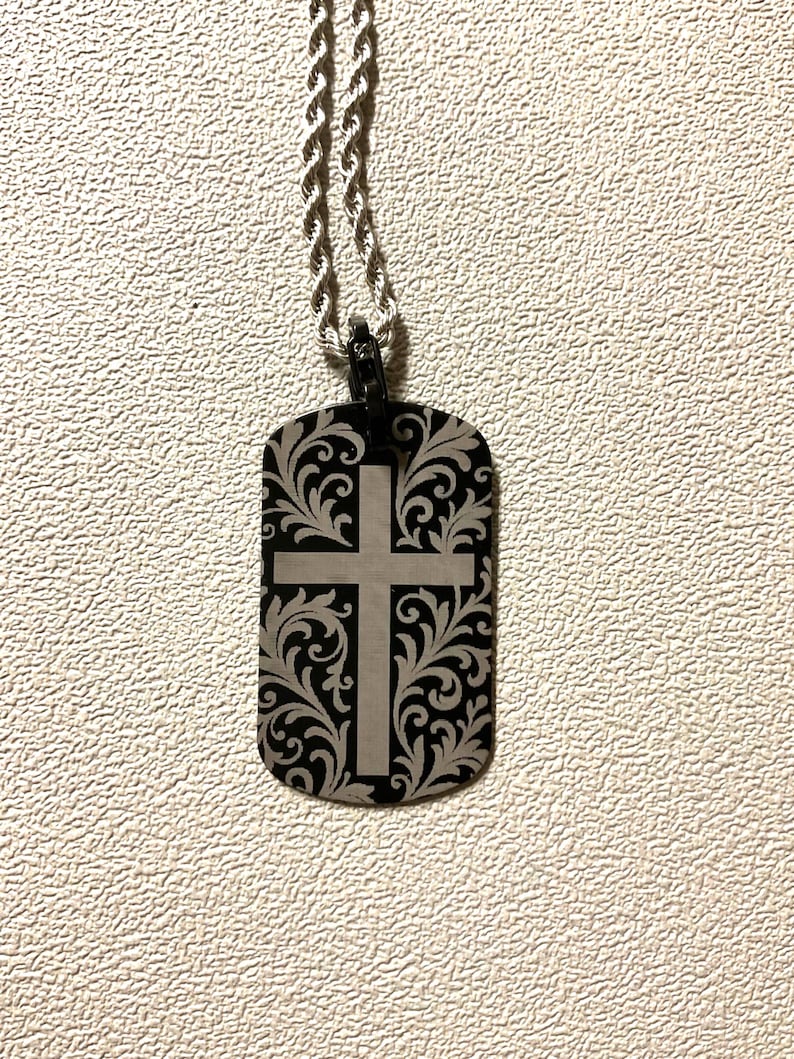
On this crucifix tag, the cross occupies roughly 45% of the tag's height. The filigree scrollwork wraps it without competing — same visual weight, opposite geometry. That balance is what makes the piece scan cleanly from across a room.
Use pattern density to frame, not fill
Repeating patterns — filigree, peace symbols, waves, small icons — work beautifully as a background field, but only if the density is tuned. Too sparse and the tag looks incomplete. Too dense and the focal element loses its edge against the noise.
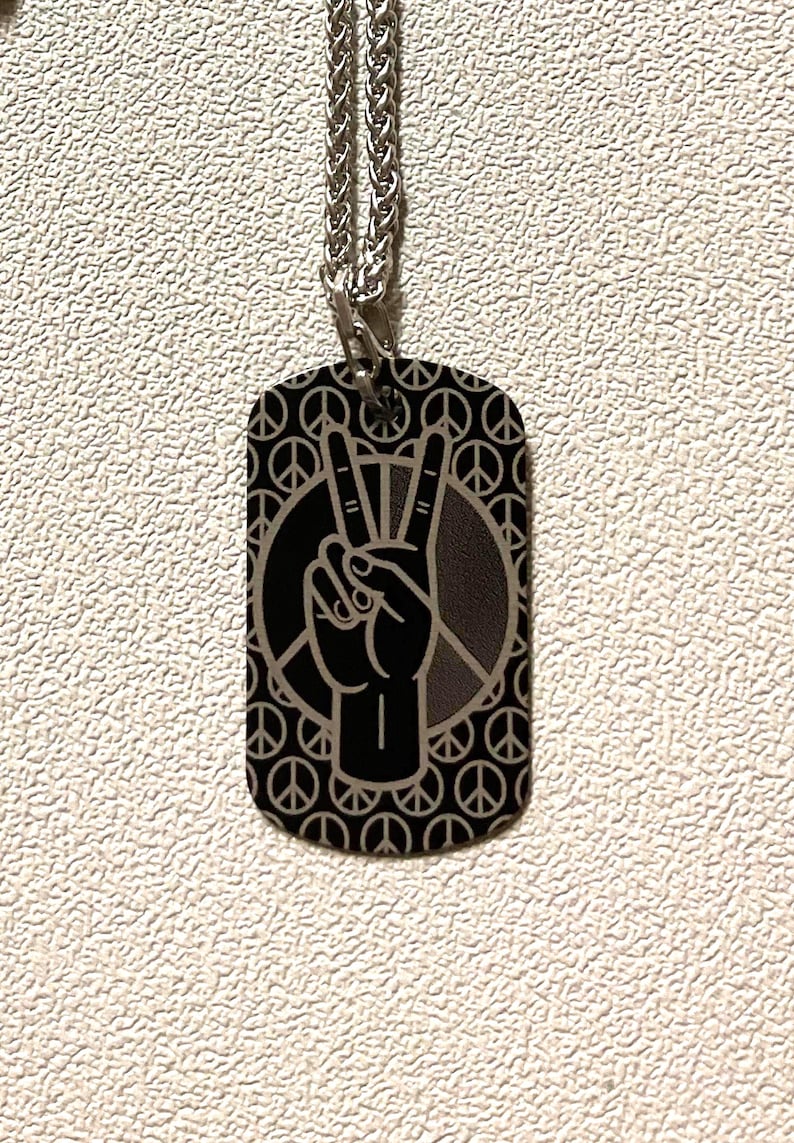
On the peace hand tag, the background is a grid of small peace symbols at low contrast. The central hand + circle sits on top at full contrast. Same motif, two scales, two densities — the eye reads the hero first and the pattern second, which is the order you want.
Contrast rules to design by
- Two contrast levels, not three. Foreground bold, background subtle. Anything in between muddies both.
- Line weight matters at scale. Lines thinner than ~0.4mm can vanish under the laser on dark anodized aluminum.
- Leave breathing room at the edge. A 2–3mm clear margin around the perimeter keeps the design from looking cropped.
- Avoid gradients and halftones. The laser is binary — it either marks or it doesn't. Solid shapes read; smooth fades don't.
Text: less than you think
If the tag also carries text, keep it to one line of eight characters or fewer, placed either along the top edge or below the focal icon. Our personalized dog tag guide covers what engravings age well — names, single words, dates — and what to avoid.
Commission or start from a stock design
Every custom tag from the studio starts with a mockup you approve before the laser runs. Browse stock designs in the shop to see how contrast and pattern density read in hand, or start a custom commission through our services page.
Local to Solano County? See our guide to custom laser etching in Solano County for pickup and small-business options.
Keep reading
Laser Etching & Craft
What Is Laser Etching on Aluminum? A Studio Explainer
How laser etching on aluminum actually works, what the equipment does, and why it holds up longer than stamped or printed alternatives.
Laser Etching & Craft
The Personalized Dog Tag Guide: What to Engrave
How to design a personalized laser-engraved dog tag — name conventions, phrases that age well, and layout limits.
Laser Etching & Craft
Custom Laser Etching for Small Businesses in Solano County
Custom laser-etched coasters, dog tags, and business cards for Solano County small businesses, nonprofits, and events — with local pickup in Vacaville.